Production Process Editor: Designing Industrial Workflows with ReactFlow
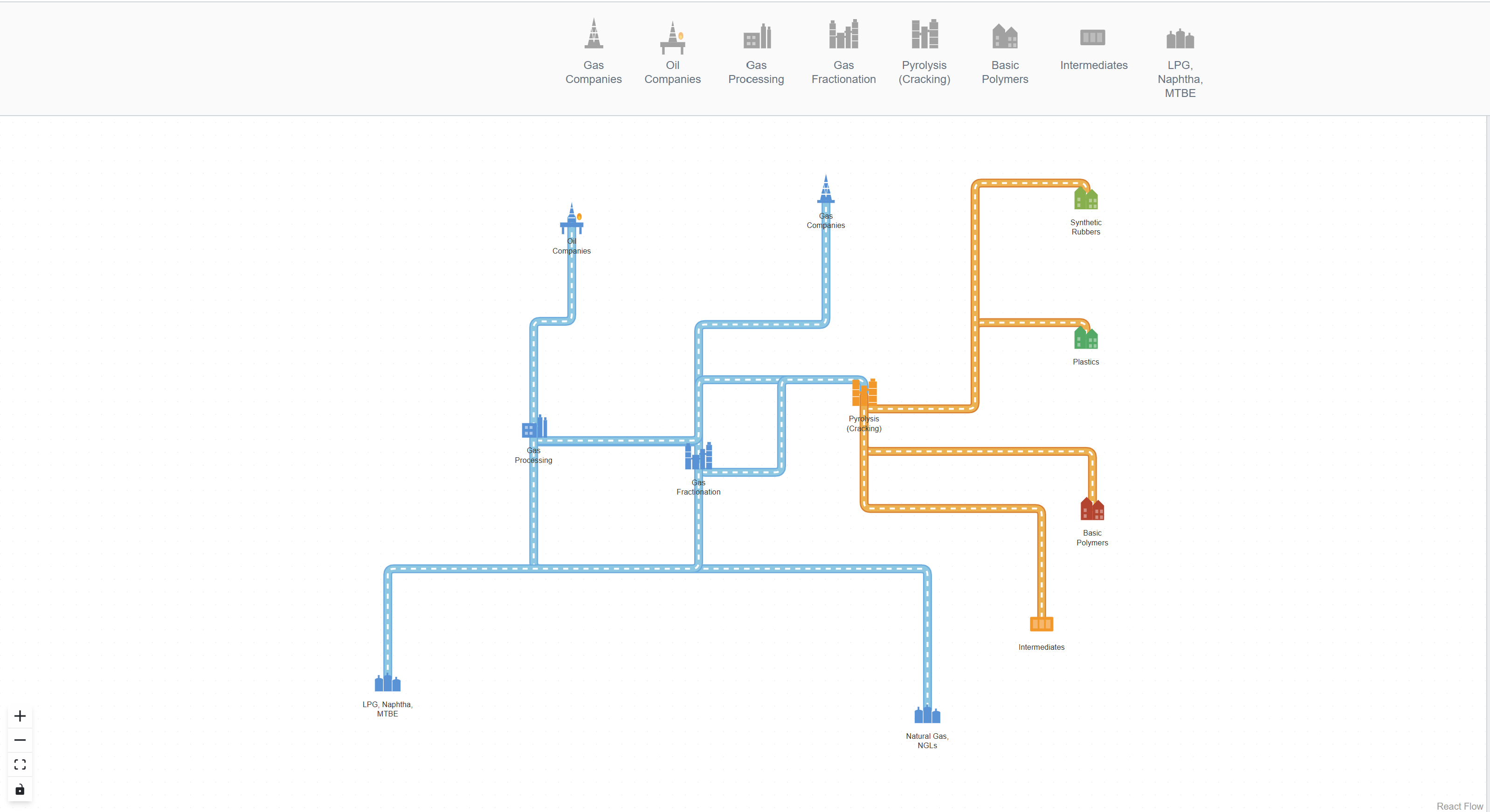
The Production Process Editor is a specialized diagramming tool designed for creating detailed production process workflows. Built on ReactFlow's powerful architecture, this professional solution enables designers and engineers to visualize complex production systems through an intuitive interface.
Understanding Production Process Visualization
Production process visualization is crucial for manufacturing, industrial design, and production planning. It helps teams understand material flow, process dependencies, and system architecture at a glance. The Production Process Editor makes this visualization accessible and professional.
Key Features
Element Palette System
At the top of the interface, you'll find a comprehensive palette containing specialized production nodes. This palette includes:
- Machine nodes: Represent different manufacturing equipment
- Process nodes: Show various production stages
- Storage nodes: Indicate material storage points
- Control elements: Display control and monitoring points
Simply drag nodes from the palette into the main diagram area to start building your production workflow.
Port-Based Connection System
Each node in the Production Process Editor features a unique design:
- SVG Shape at Top: Visual representation of the process type
- Rectangular Port at Bottom: Connection point for pipes (links)
To create connections between production stages, simply drag from one node's port to another. This creates clear visual representations of material flow, data flow, or process dependencies.
// Example: Creating a port-based connection
const nodes = [
  {
    id: 'machine-1',
    type: 'production',
    position: { x: 100, y: 100 },
    data: { label: 'Machine 1' },
    // Port configuration
    sourcePosition: 'bottom',
    targetPosition: 'top',
  },
  {
    id: 'machine-2',
    type: 'production',
    position: { x: 300, y: 100 },
    data: { label: 'Machine 2' },
    sourcePosition: 'bottom',
    targetPosition: 'top',
  },
];

const edges = [
  {
    id: 'e1-2',
    source: 'machine-1',
    target: 'machine-2',
    type: 'smoothstep',
  },
];
Dual-Mode Interface
The editor provides two distinct modes:
-
Designer Mode: Full access to all editing capabilities
- Property inspector for modifying node and link properties
- Real-time configuration of process parameters
- Visual attribute customization
-
End-User Mode: Focused on information consumption
- Detailed information panel when nodes are selected
- Clear visualization of production flows
- Read-only exploration of processes
Property Inspector
For designers, the Inspector panel provides comprehensive control:
- Node Properties: Modify process parameters, labels, and configurations
- Link Properties: Adjust connection types, flow directions, and pipe specifications
- Visual Attributes: Customize colors, shapes, and styling
The inspector updates in real-time as you make changes, providing immediate visual feedback.
Use Cases
Manufacturing Process Design
Design complete manufacturing workflows from raw materials to finished products. Visualize each stage of production, identify bottlenecks, and optimize flow.
Production Planning
Plan production schedules by visualizing process dependencies. Understand which stages can run in parallel and which require sequential execution.
Industrial Documentation
Create professional documentation for production systems. Export diagrams to PDF, PNG, or SVG for inclusion in technical manuals and training materials.
Process Optimization
Identify inefficiencies in production flows through visual analysis. Test different configurations and layouts before implementing changes in the actual production line.
Implementation Tips
Custom Node Types
Create specialized node types for your industry:
const customNodeTypes = {
  production: ProductionNode,
  storage: StorageNode,
  control: ControlNode,
  quality: QualityCheckNode,
};
Port Configuration
Configure ports to match your connection requirements:
const nodeWithPorts = {
  id: 'custom-node',
  type: 'custom',
  position: { x: 0, y: 0 },
  data: {
    label: 'Custom Process',
    ports: {
      inputs: ['input-1', 'input-2'],
      outputs: ['output-1', 'output-2'],
    },
  },
};
Export Functionality
Export your production diagrams for documentation:
const exportDiagram = () => {
  // Export to JSON for data storage
  const jsonData = JSON.stringify({ nodes, edges });

  // Export to SVG for documentation
  const svgData = reactFlowInstance.toSVG();

  // Export to PNG for presentations
  const pngData = reactFlowInstance.toImage();
};
Best Practices
- Start with a Clear Structure: Plan your production flow before adding nodes
- Use Consistent Naming: Follow a naming convention for nodes and connections
- Group Related Processes: Use visual grouping to organize complex workflows
- Document Key Processes: Add detailed descriptions to important nodes
- Regular Updates: Keep diagrams synchronized with actual production changes
Integration with Production Systems
The Production Process Editor can integrate with:
- MES (Manufacturing Execution Systems): Import actual production data
- ERP Systems: Connect with enterprise resource planning
- SCADA Systems: Link with supervisory control and data acquisition
- Custom APIs: Integrate with proprietary production systems
Conclusion
The Production Process Editor provides a powerful solution for visualizing and designing production processes. Whether you're documenting existing workflows, planning new production lines, or optimizing current processes, this tool makes complex industrial systems easy to understand and modify.
Start building your production process diagrams today and see how visual workflow design can transform your manufacturing operations!