Building a Custom Diagramming Studio with React Flow
React Flow is an incredibly versatile library. While it's commonly used for simple flowcharts or workflow automation builders, its highly customizable node architecture makes it perfect for building complex Custom Diagramming Tools (similar to Draw.io or Visio).
In this post, we'll explore our premium React Flow Design Studio template, which demonstrates how to build a fully interactive shape diagramming tool using React Flow, TypeScript, and Tailwind CSS.
The Challenge of Building Diagramming Software
Building a drag-and-drop diagramming tool requires far more than just standard boxes and text nodes. Users expect to be able to drag a wide variety of shapes, resize them dynamically, and connect them with intelligent edge routing.
Key challenges include:
- Dynamic SVG Shapes: Creating a library of resizable, customizable SVG nodes (stars, hexagons, circles, process boxes).
- Intuitive Sidebar: Implementing an interactive drag-and-drop palette that allows users to seamlessly drop new shapes onto the canvas.
- Smart Connections: Allowing users to connect shapes from any angle and having edges route themselves intelligently.
Exploring the Design Studio Template
Our premium React Flow Design Studio template solves these challenges out-of-the-box. It provides a production-ready foundation for building complex diagramming applications.
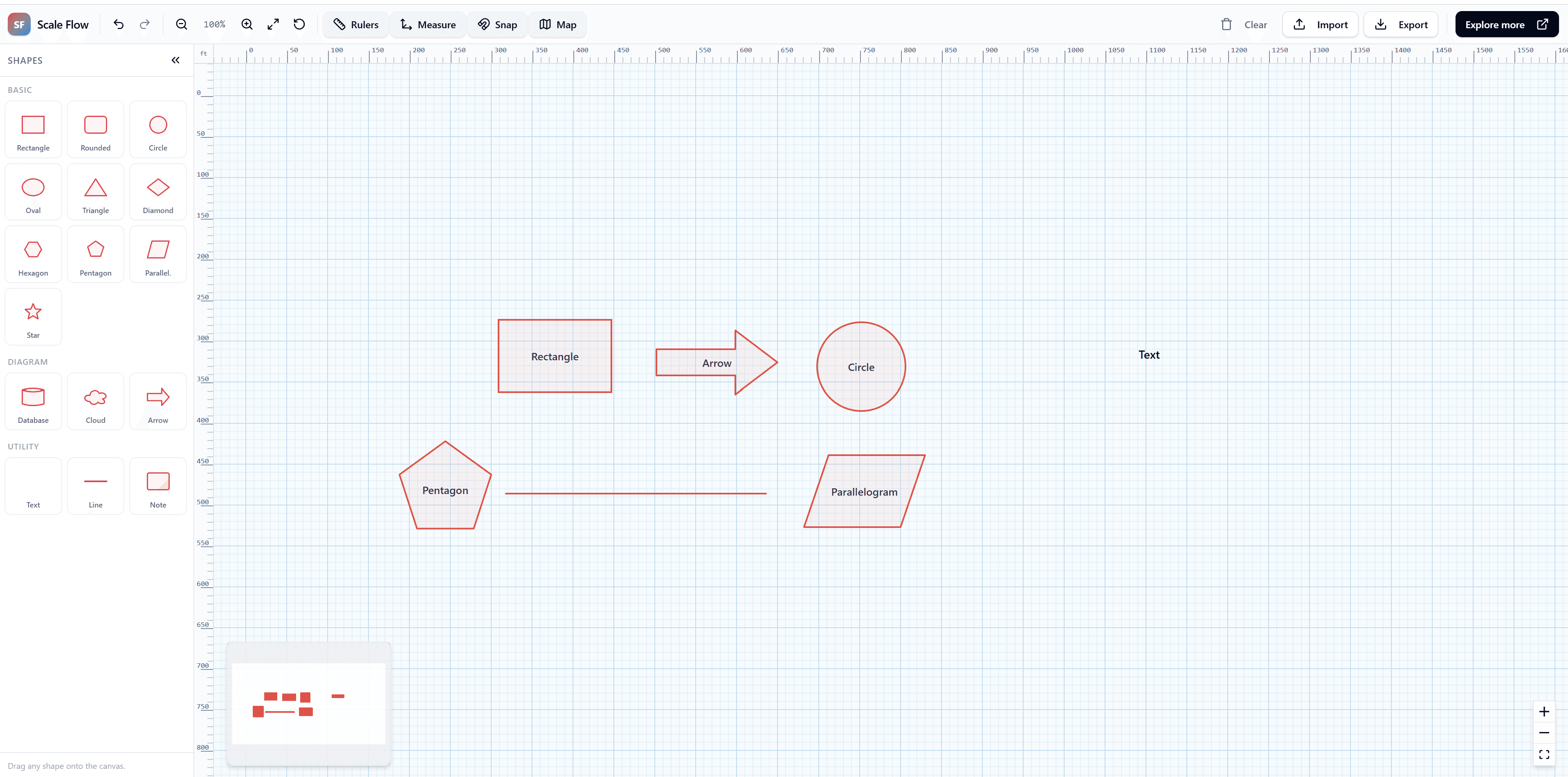
1. Extensive Custom Shape Library
The template includes beautifully designed, custom React Flow nodes for a wide array of diagramming primitives:
- Basic Shapes (Circles, Rectangles, Triangles)
- Complex Polygons (Hexagons, Pentagons, Stars)
- Flowchart specific symbols (Decision diamonds, Data cylinders, Process boxes)
- Arrows and connection pointers
2. Drag-and-Drop Sidebar Mechanics
We implemented a robust sidebar component using the native HTML5 drag-and-drop API integrated smoothly with React Flow. Users can easily browse through categories ("Shapes in Use", "Symbols") and drop them onto the canvas.
// Example pseudo-code of handling a shape drop event
const onDrop = (event) => {
  event.preventDefault();
  const shapeType = event.dataTransfer.getData('application/reactflow');
  const position = reactFlowInstance.screenToFlowPosition({
    x: event.clientX,
    y: event.clientY,
  });

  const newNode = {
    id: getId(),
    type: shapeType,
    position,
    data: { label: `${shapeType} node` },
  };
  setNodes((nds) => nds.concat(newNode));
}
3. Beautiful, Modern UI
Built entirely with Tailwind CSS, the editor features a sleek, light-themed canvas, a collapsible sidebar, and clean, modern typography.
Why Buy the Template?
If you are tasked with building a web-based drawing tool, whiteboard, or flowchart software, creating all the custom SVG shapes and drag-and-drop mechanics from scratch can take weeks.
By purchasing the React Flow Design Studio template for $50, you get:
- Full TypeScript Source Code: No obfuscation, no vendor lock-in.
- Advanced Custom Nodes: Learn exactly how to build interactive, resizable SVG nodes.
- Drag & Drop Logic: See exactly how we handle complex React Flow sidebar integration.
View the Live Demo here and start building your custom diagramming studio today!